# EOS-Contabilidad-Reportes-Reportes de contabilidad

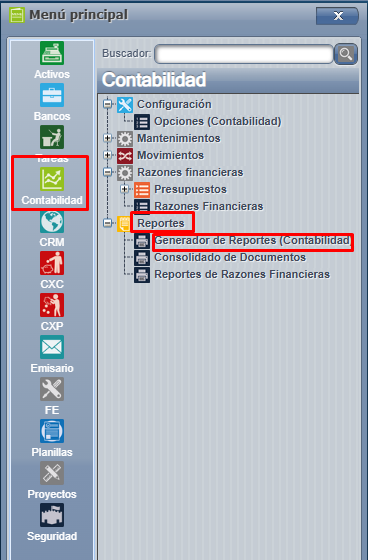
<span style="font-size: 12pt; font-family: arial, helvetica, sans-serif;">Contabilidad =&gt; Reportes =&gt; Generador de Reportes (Contabilidad ) : </span>

[![Screenshot_1092.png](https://ayuda.cronuserp.com/uploads/images/gallery/2026-04/scaled-1680-/screenshot-1092.png)](https://ayuda.cronuserp.com/uploads/images/gallery/2026-04/screenshot-1092.png)

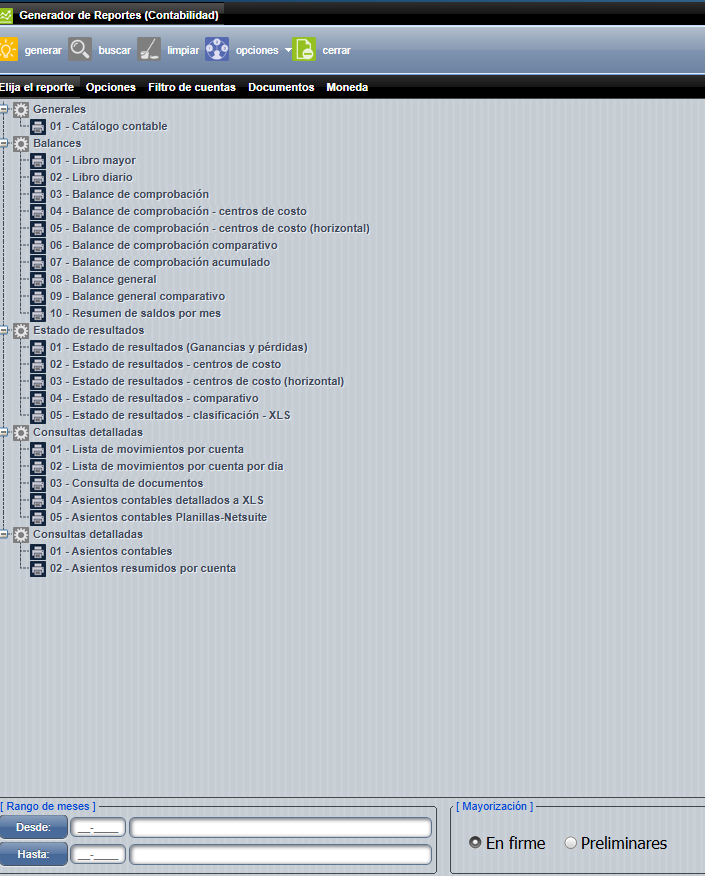
<span style="font-size: 12pt; font-family: arial, helvetica, sans-serif;">Al ingresar en la pantalla se nos presenta la lista de reportes que hay en contabilidad.</span>

[![Screenshot_1093.png](https://ayuda.cronuserp.com/uploads/images/gallery/2026-04/scaled-1680-/screenshot-1093.png)](https://ayuda.cronuserp.com/uploads/images/gallery/2026-04/screenshot-1093.png)

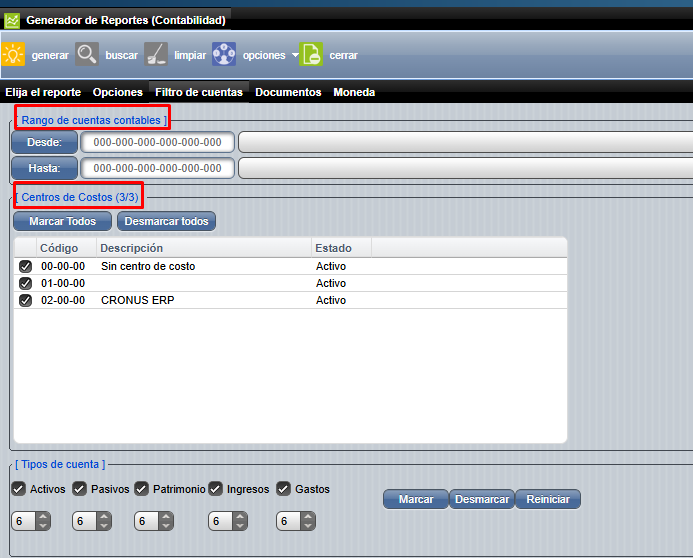
<span style="font-size: 12pt; font-family: arial, helvetica, sans-serif;">Para realizar un reporte se debe ingresar la información cómo el rango de fechas (Desde - Hasta ), la cuenta contable con la que deseamos generar el reporte , mayorización: </span>

<span style="font-size: 12pt; font-family: arial, helvetica, sans-serif;">[![Screenshot_1094.png](https://ayuda.cronuserp.com/uploads/images/gallery/2026-04/scaled-1680-/screenshot-1094.png)](https://ayuda.cronuserp.com/uploads/images/gallery/2026-04/screenshot-1094.png)</span>

<span style="font-size: 12pt; font-family: arial, helvetica, sans-serif;">Una vez que tengamos seleccionado el reporte que necesitamos y los parámetros del mismo, presionamos "generar**":** </span>

<span style="font-size: 12pt; font-family: arial, helvetica, sans-serif;">[![Screenshot_1095.png](https://ayuda.cronuserp.com/uploads/images/gallery/2026-04/scaled-1680-/screenshot-1095.png)](https://ayuda.cronuserp.com/uploads/images/gallery/2026-04/screenshot-1095.png)</span>

<span style="font-size: 12pt; font-family: arial, helvetica, sans-serif;">Wikis relacionados:</span>

- <span style="font-size: 12pt; font-family: arial, helvetica, sans-serif;">[<span style="color: #000080;">Asientos contables detallados a XML</span>](https://ayuda.cronuserp.com/EOS-Contabilidad-Reportes-Reportes-de-contabilidad-Asientos-contable-detallados-a-XML)</span>