# CRONUS Sistema Opciones Pinpad - Recibos

<span style="font-size: 12pt; font-family: arial, helvetica, sans-serif;">**Recibos de dinero**</span>

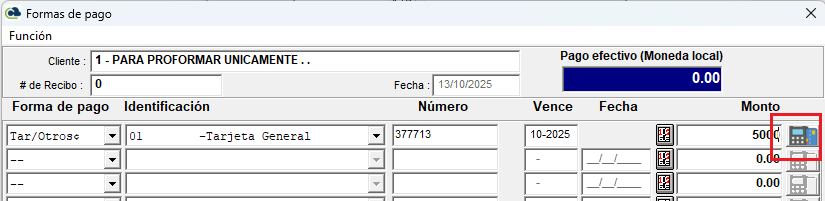
<span style="font-size: 12pt; font-family: arial, helvetica, sans-serif;">1. En las formas de pago de cualquier recibo ahora se habilita un botón para leer el Pinpad.</span>

<span style="font-size: 12pt; font-family: arial, helvetica, sans-serif;">[![07 pinpad.png](https://ayuda.cronuserp.com/uploads/images/gallery/2025-10/scaled-1680-/07-pinpad.png)](https://ayuda.cronuserp.com/uploads/images/gallery/2025-10/07-pinpad.png)</span>

<span style="font-size: 12pt; font-family: arial, helvetica, sans-serif;">2. El monto debe ser mayor a cero y correspondiente al tipo de transacción.</span>

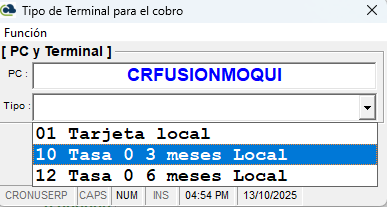
<span style="font-size: 12pt; font-family: arial, helvetica, sans-serif;">3. Al presionar ese botón CRONUS llama al equipo del Banco y le pasa el monto digitado.</span>

<span style="font-size: 12pt; font-family: arial, helvetica, sans-serif;">[![08  pinpad.png](https://ayuda.cronuserp.com/uploads/images/gallery/2025-10/scaled-1680-/08-pinpad.png)](https://ayuda.cronuserp.com/uploads/images/gallery/2025-10/08-pinpad.png)</span>

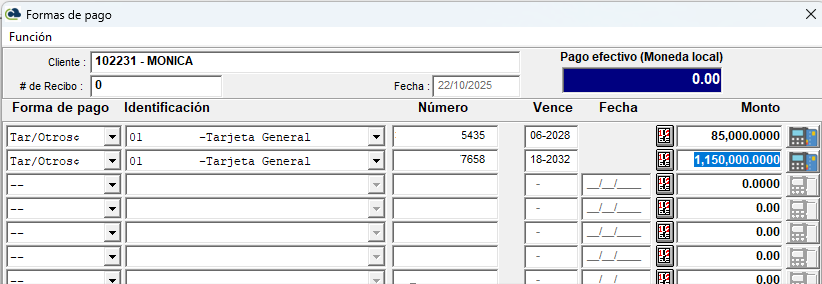
<span style="font-size: 12pt; font-family: arial, helvetica, sans-serif;">4. Puede generar múltiples pagos de muchas tarjetas sin embargo por defecto se sugiere tarjeta y por el monto total.</span>

<span style="font-size: 12pt; font-family: arial, helvetica, sans-serif;">[![FormasdepagoPINPAD.png](https://ayuda.cronuserp.com/uploads/images/gallery/2025-10/scaled-1680-/formasdepagopinpad.png)](https://ayuda.cronuserp.com/uploads/images/gallery/2025-10/formasdepagopinpad.png)</span>

<span style="font-size: 12pt; font-family: arial, helvetica, sans-serif;">5. Si cierra la pantalla luego de haber hecho una lectura con el Pinpad puede volver a abrirla.</span>

1. 1. 1. <span style="font-size: 12pt; font-family: arial, helvetica, sans-serif;">Siempre y cuando sea la misma PC.</span>
        2. <span style="font-size: 12pt; font-family: arial, helvetica, sans-serif;">Siempre y cuando sea el mismo usuario.</span>
        3. <span style="font-size: 12pt; font-family: arial, helvetica, sans-serif;">Siempre y cuando sea el mismo cliente.</span>

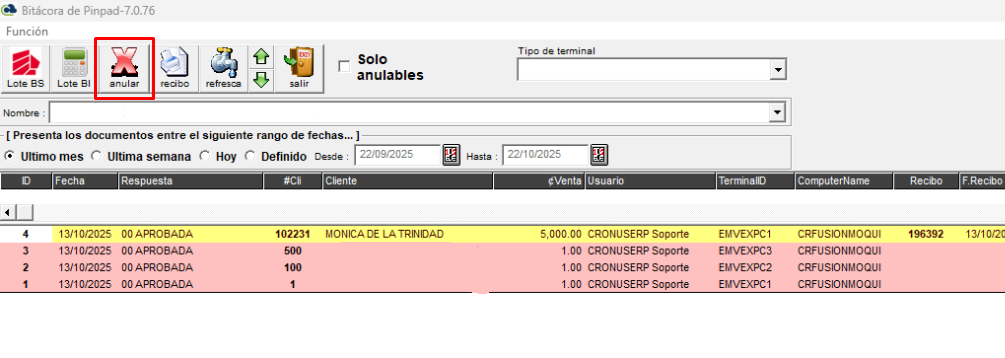
<span style="font-size: 12pt; font-family: arial, helvetica, sans-serif;">6. De otra forma si no desea cargar la transacción debe anularla en la bitácora de Pinpad.</span>

<span style="font-size: 12pt; font-family: arial, helvetica, sans-serif;">[![BitacoraPINPAD.png](https://ayuda.cronuserp.com/uploads/images/gallery/2025-10/scaled-1680-/bitacorapinpad.png)](https://ayuda.cronuserp.com/uploads/images/gallery/2025-10/bitacorapinpad.png)</span>

<span style="font-size: 12pt; font-family: arial, helvetica, sans-serif;">7. Pantalla de consulta de PinPad, CRONUS debe esperar la respuesta del equipo del Banco, si esto falla debe volver a leer.</span>

---

[![banner-largo.jpg](https://ayuda.cronuserp.com/uploads/images/gallery/2025-10/scaled-1680-/banner-largo.jpg)](https://ayuda.cronuserp.com/uploads/images/gallery/2025-10/banner-largo.jpg)