# CRONUS WEB CXC MOVIMIENTOS HOJA DE RUTA

<span style="font-weight: 400; font-size: 12pt; font-family: arial, helvetica, sans-serif;">Derecho relacionado:</span>

- <span style="font-size: 12pt; font-family: arial, helvetica, sans-serif;"> "**PRCHRUTA"**</span>
 
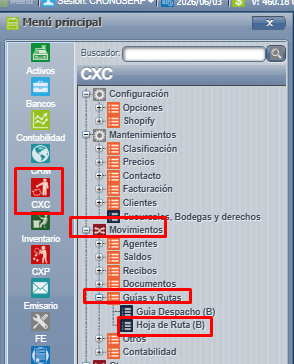
<span style="font-size: 12pt; font-family: arial, helvetica, sans-serif;">Menú **=&gt;** CXC **=&gt;** Movimientos **=&gt;** Guías y Rutas **=&gt;** Hoja de Ruta: </span>

<span style="font-size: 12pt; font-family: arial, helvetica, sans-serif;">![ruta hoja.png](/files/CRONUS-WEB-CXC-MOVIMIENTOS-HOJA-DE-RUTA/ruta%20hoja.png)</span>

<span style="font-size: 12pt; font-family: arial, helvetica, sans-serif;"> </span>

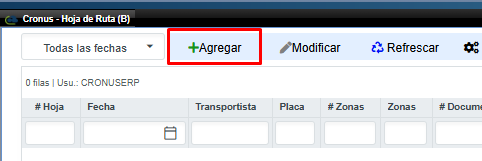
<span style="font-size: 12pt; font-family: arial, helvetica, sans-serif;">Ingresamos a hoja de ruta y ahí para poder crear una hoja debemos presionar **" AGREGAR "** </span>

<span style="font-size: 12pt; font-family: arial, helvetica, sans-serif;">![hoja de ruta agregar.png](/files/CRONUS-WEB-CXC-MOVIMIENTOS-HOJA-DE-RUTA/hoja%20de%20ruta%20agregar.png)</span>

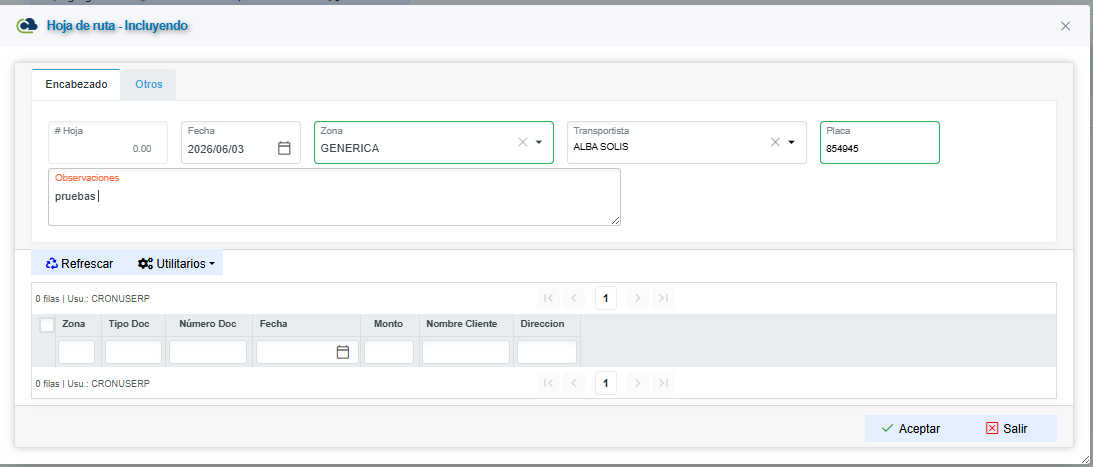
<span style="font-size: 12pt; font-family: arial, helvetica, sans-serif;"> <span style="font-weight: 400;">Ahí nos abre está pantalla en la cejilla para crear la nueva hoja de ruta.Para el encabezado debemos llenar siguientes campos( Son obligatorios ) :</span></span>

- <span style="font-size: 12pt; font-family: arial, helvetica, sans-serif;">Fecha</span>
- <span style="font-size: 12pt; font-family: arial, helvetica, sans-serif;">Zona</span>
- <span style="font-size: 12pt; font-family: arial, helvetica, sans-serif;">Transportista </span>
- <span style="font-size: 12pt; font-family: arial, helvetica, sans-serif;">Observaciones</span>
 
<span style="font-size: 12pt; font-family: arial, helvetica, sans-serif;">El campo del # de Hoja no se puede modificar ya que este lo define el sistema por defecto. </span>

<span style="font-size: 12pt; font-family: arial, helvetica, sans-serif;">Aquí definimos la fecha la cuál se puede modificar, la zona (Ruta) puede ser multizona, transportista, la placa del vehículo y las observaciones: </span>

<span style="font-size: 12pt; font-family: arial, helvetica, sans-serif;"></span>

<span style="font-size: 12pt; font-family: arial, helvetica, sans-serif;"> </span>

  
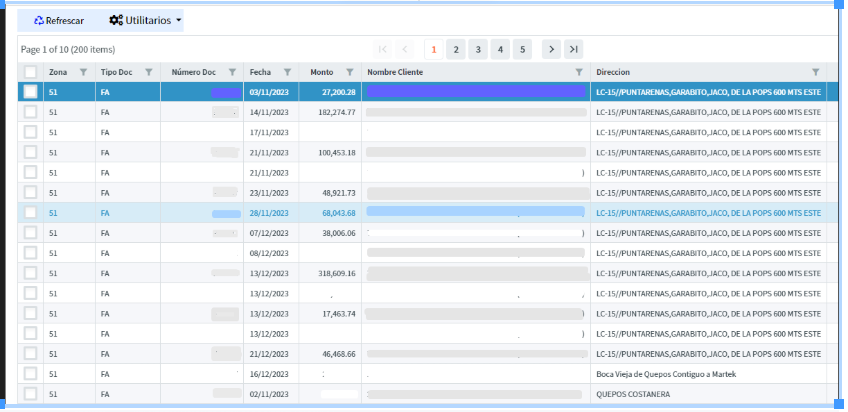
<span style="font-size: 12pt; font-family: arial, helvetica, sans-serif;">Aquí se carga la pantalla con las facturas de esa ruta, ya sea que se marque todas las facturas o ciertas facturas que se va a llevar el vehículo: </span>

<span style="font-size: 12pt; font-family: arial, helvetica, sans-serif;"></span>

 <table id="bkmrk-en-la-cejilla-otros-" style="width: 1668px;"> <tbody> <tr> <td style="width: 1667px;"><span style="font-weight: 400; font-size: 12pt; font-family: arial, helvetica, sans-serif;">En la cejilla **otros** podemos ingresar la siguiente información:</span>

 </td> </tr> <tr> <td style="width: 1667px;">- <span style="font-weight: 400; font-size: 12pt; font-family: arial, helvetica, sans-serif;">Cargador (persona que va cargar el vehículo )</span>
 
 </td> </tr> <tr> <td style="width: 1667px;">- <span style="font-weight: 400; font-size: 12pt; font-family: arial, helvetica, sans-serif;"> Inicio carga (el dia que se va a cargar el vehículo y la hora)</span>
 
 </td> </tr> <tr> <td style="width: 1667px;">- <span style="font-weight: 400; font-size: 12pt; font-family: arial, helvetica, sans-serif;"> Fin carga ( fecha que se termina de cargar el vehículo)</span>
 
 </td> </tr> <tr> <td style="width: 1667px;">- <span style="font-weight: 400; font-size: 12pt; font-family: arial, helvetica, sans-serif;">Fecha de salida (Dia que inicia la ruta)</span>
 
 </td> </tr> <tr> <td style="width: 1667px;">- <span style="font-weight: 400; font-size: 12pt; font-family: arial, helvetica, sans-serif;"> KM Salida (kilómetros que tiene el vehículo antes de salir de ruta ( campo obligatorio )</span>
 
 </td> </tr> <tr> <td style="width: 1667px;">- <span style="font-weight: 400; font-size: 12pt; font-family: arial, helvetica, sans-serif;"> Fecha de entrega</span>
 
 </td> </tr> <tr> <td style="width: 1667px;">- <span style="font-weight: 400; font-size: 12pt; font-family: arial, helvetica, sans-serif;"> KM entrada ( kilómetros con los que llega el vehículo) ( campo obligatorio )</span>
 
 </td> </tr> <tr> <td style="width: 1667px;">- <span style="font-weight: 400; font-size: 12pt; font-family: arial, helvetica, sans-serif;"> Recibe ( persona que recibe el vehículo )</span>
 
 </td> </tr> <tr> <td style="width: 1667px;"><span style="font-size: 12pt; font-family: arial, helvetica, sans-serif;">Presionamos **" ACEPTAR " y "SALIR"** ahí nos vamos a la pantalla principal y vemos la hora de ruta.</span><span style="font-size: 12pt; font-family: arial, helvetica, sans-serif;">![otros aceptar.png](/files/CRONUS-WEB-CXC-MOVIMIENTOS-HOJA-DE-RUTA/otros%20aceptar.png)</span><span style="font-size: 12pt; font-family: arial, helvetica, sans-serif;">![hoja de ruta 2.png](/files/CRONUS-WEB-CXC-MOVIMIENTOS-HOJA-DE-RUTA/hoja%20de%20ruta%202.png)</span>

<span style="font-weight: 400; font-size: 12pt; font-family: arial, helvetica, sans-serif;">Una vez que se cargue el encabezado y otros, el sistema habilita la pantalla con las facturas de esa ruta ya sea para que se marque todas las facturas o ciertas facturas que serían las que se va a llevar el transportista asignado en dicha hoja:</span>

 </td> </tr> </tbody> </table>

[![Screenshot_53.png](https://ayuda.cronuserp.com/uploads/images/gallery/2025-08/scaled-1680-/screenshot-53.png)](https://ayuda.cronuserp.com/uploads/images/gallery/2025-08/screenshot-53.png)[![Screenshot_54.png](https://ayuda.cronuserp.com/uploads/images/gallery/2025-08/scaled-1680-/screenshot-54.png)](https://ayuda.cronuserp.com/uploads/images/gallery/2025-08/screenshot-54.png)<span style="font-size: 12pt; font-family: arial, helvetica, sans-serif;"></span>

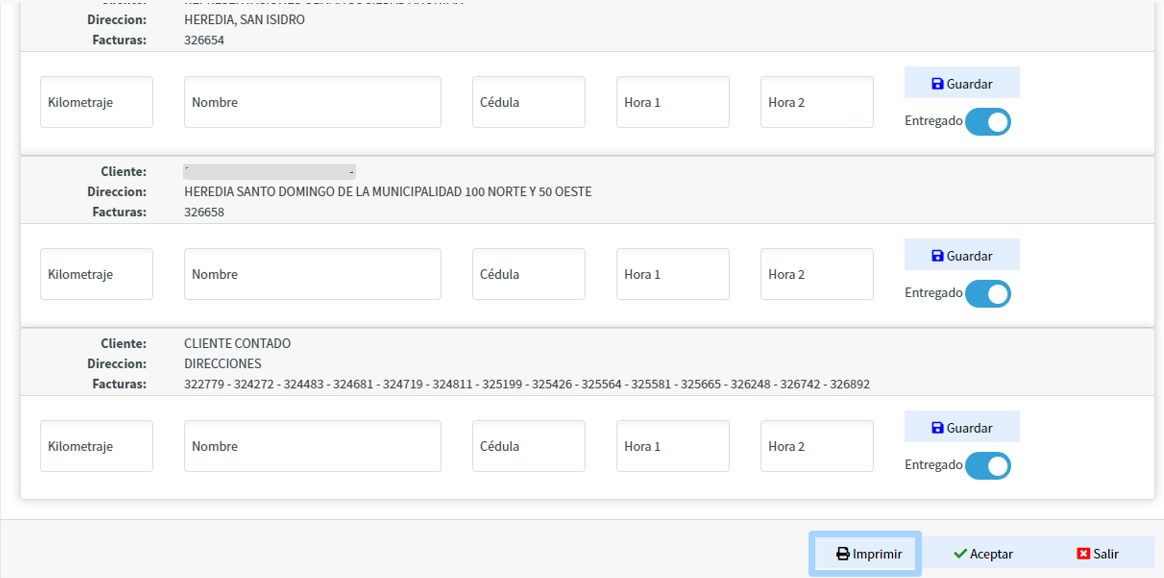
 <table id="bkmrk-luego-al-crear-esta-"> <tbody> <tr> <td><span style="font-weight: 400; font-size: 12pt; font-family: arial, helvetica, sans-serif;">Luego al crear esta hoja de ruta, si presionamos modificar se carga otra información, aquí se agrupa por cliente y con la información de las facturas de cada cliente, ya que en la ruta puede ser que no vaya a dejar mercadería solo a un cliente si no a varios.</span>

 </td> </tr> <tr> <td><span style="font-weight: 400; font-size: 12pt; font-family: arial, helvetica, sans-serif;">Por lo cuál acá se debe de ingresar la siguiente información:</span>

 </td> </tr> <tr> <td>- <span style="font-weight: 400; font-size: 12pt; font-family: arial, helvetica, sans-serif;"> Kilometraje que recorrió para llegar donde ese cliente</span>
 
 </td> </tr> <tr> <td>- <span style="font-weight: 400; font-size: 12pt; font-family: arial, helvetica, sans-serif;">El nombre de la persona que recibe la mercadería</span>
 
 </td> </tr> <tr> <td>- <span style="font-weight: 400; font-size: 12pt; font-family: arial, helvetica, sans-serif;"> Cédula de la persona que le recibió</span>
 
 </td> </tr> <tr> <td>- <span style="font-weight: 400; font-size: 12pt; font-family: arial, helvetica, sans-serif;"> La hora de llegada ( hora 1 )</span>
 
 </td> </tr> <tr> <td>- <span style="font-weight: 400; font-size: 12pt; font-family: arial, helvetica, sans-serif;"> Hora cuando se retira de donde el cliente ( hora 2 )</span>
 
 </td> </tr> </tbody> </table>

 <table id="bkmrk-%2A-marcar-c%C3%B3mo-entreg"> <tbody> <tr> <td><span style="font-weight: 400; font-size: 12pt; font-family: arial, helvetica, sans-serif;">\* Marcar cómo entregado ( siempre va a estar marcado por defecto) , si lo desmarcan es porque no pudieron entregarle a dicho cliente y las facturas serán liberadas para usar posteriormente en otra hoja de ruta.</span>

 </td> </tr> <tr> <td><span style="font-weight: 400; font-size: 12pt; font-family: arial, helvetica, sans-serif;">\* Los datos que queden marcado cómo entregado ya no se pueden incluir en otra hoja de ruta.</span>

 </td> </tr> <tr> <td><span style="font-weight: 400; font-size: 12pt; font-family: arial, helvetica, sans-serif;">En la cejilla de otros podemos ver toda la información que se incluyó de las hojas de ruta:</span>

 </td> </tr> <tr> <td><span style="font-weight: 400; font-size: 12pt; font-family: arial, helvetica, sans-serif;">Por último podemos encontrar en la cejillas de otros la opción de imprimir las hojas de ruta:</span>

 </td> </tr> </tbody> </table>

<span style="font-size: 12pt; font-family: arial, helvetica, sans-serif;">![datos de entrga.png](/files/CRONUS-WEB-CXC-MOVIMIENTOS-HOJA-DE-RUTA/datos%20de%20entrga.png)</span>

 <table id="bkmrk-por-%C3%BAltimo-podemos-e" style="height: 113px;"> <tbody> <tr style="height: 41px;"> <td style="height: 41px; width: 653.703px;"><span style="font-weight: 400; font-size: 12pt; font-family: arial, helvetica, sans-serif;">Por último podemos encontrar en la cejillas de otros la opción de imprimir las hojas de ruta:</span>

 </td> </tr> </tbody> </table>

<span style="font-size: 12pt; font-family: arial, helvetica, sans-serif;"></span>