# WEB - CXC - MOVIMIENTOS - OTROS - TIQUETES

<span style="color: #444444; font-size: 26pt;">CXC-Movimientos-Tiquetes</span>

<span style="font-size: 12pt; font-family: arial, helvetica, sans-serif;">**Seguridad**</span>

- <span style="font-size: 12pt; font-family: arial, helvetica, sans-serif;">**TIKETSAPROB**</span>

<span style="font-size: 12pt; font-family: arial, helvetica, sans-serif;">**Proceso**</span>

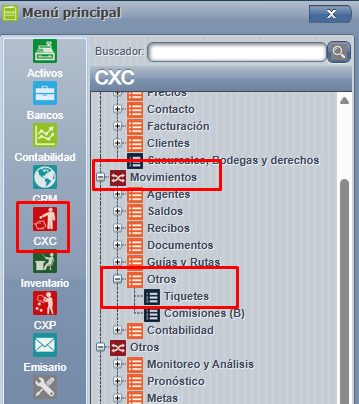
<span style="font-size: 12pt; font-family: arial, helvetica, sans-serif;">En este wiki podemos ver la forma en la cuál se pueden procesar Tiquetes desde la página WEB.</span>

<span style="font-size: 12pt; font-family: arial, helvetica, sans-serif;">**CXC =&gt; Movimientos =&gt; Otros =&gt; Tiquetes**, cómo lo muestra la siguiente imagen:</span>

[![tk 1.png](https://ayuda.cronuserp.com/uploads/images/gallery/2026-08/scaled-1680-/tk-1.png)](https://ayuda.cronuserp.com/uploads/images/gallery/2026-08/tk-1.png)

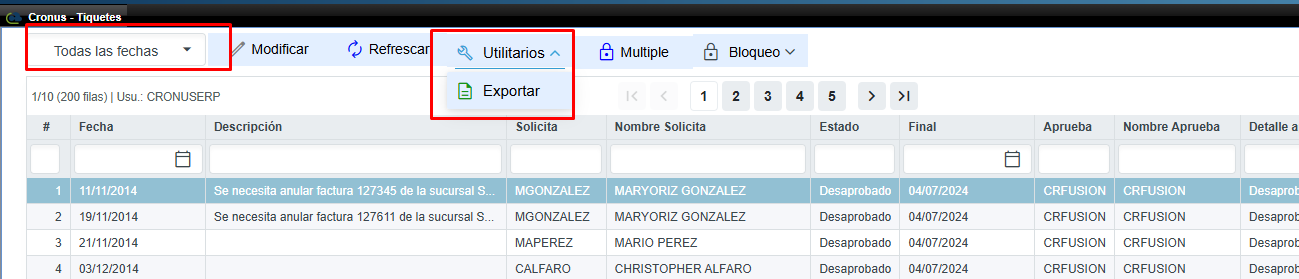
<span style="font-size: 12pt; font-family: arial, helvetica, sans-serif;">Una vez dentro de la pantalla tendremos la opción de buscar por medio de fecha, además de visualizar los Tiquetes dependiendo de su estado en el botón "Utilitarios", cómo lo muestra la siguiente imagen:</span>

[![tk2.png](https://ayuda.cronuserp.com/uploads/images/gallery/2026-08/scaled-1680-/tk2.png)](https://ayuda.cronuserp.com/uploads/images/gallery/2026-08/tk2.png)

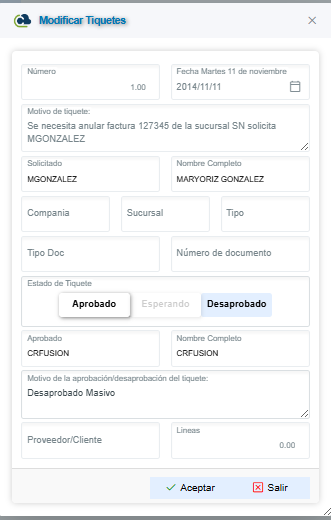
<span style="font-size: 12pt; font-family: arial, helvetica, sans-serif;">Para procesar o visualizar algún Tiquete, solamente deberemos presionar algún ítem de la lista que deseamos utilizar, una vez presionado el item, veremos la siguiente pantalla:</span>

<span style="font-size: 12pt; font-family: arial, helvetica, sans-serif;">[![tk3.png](https://ayuda.cronuserp.com/uploads/images/gallery/2026-08/scaled-1680-/tk3.png)](https://ayuda.cronuserp.com/uploads/images/gallery/2026-08/tk3.png)</span>

<span style="font-size: 12pt; font-family: arial, helvetica, sans-serif;">Información que se muestran sobre el Tiquete:</span>

- <span style="font-size: 12pt; font-family: arial, helvetica, sans-serif;">**Número**</span>
- <span style="font-size: 12pt; font-family: arial, helvetica, sans-serif;">**Fecha de creación**</span>
- <span style="font-size: 12pt; font-family: arial, helvetica, sans-serif;">**Motivo del tiquete**</span>
- <span style="font-size: 12pt; font-family: arial, helvetica, sans-serif;">**Solicitado**</span>
- <span style="font-size: 12pt; font-family: arial, helvetica, sans-serif;">**Nombre completo**</span>
- <span style="font-size: 12pt; font-family: arial, helvetica, sans-serif;">**Compañí­a - Sucursal - Tipo**</span>
- <span style="font-size: 12pt; font-family: arial, helvetica, sans-serif;">**Tipo Doc**</span>
- <span style="font-size: 12pt; font-family: arial, helvetica, sans-serif;">**Número de Documento**</span>
- <span style="font-size: 12pt; font-family: arial, helvetica, sans-serif;">**Estado del Tiquete**</span>
- <span style="font-size: 12pt; font-family: arial, helvetica, sans-serif;">**Aprobado**</span>
- <span style="font-size: 12pt; font-family: arial, helvetica, sans-serif;">**Nombre completo**</span>
- <span style="font-size: 12pt; font-family: arial, helvetica, sans-serif;">**Motivo de la aprobación/desaprobación del tiquete**</span>
- <span style="font-size: 12pt; font-family: arial, helvetica, sans-serif;">**Proveedor/cliente**</span>
- <span style="font-size: 12pt; font-family: arial, helvetica, sans-serif;">**Líneas**</span>

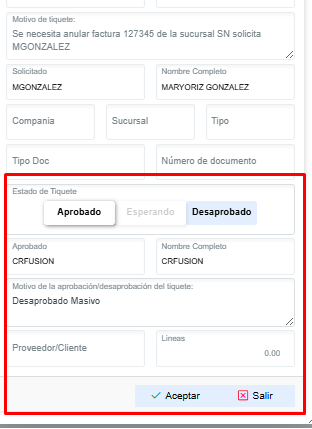
<span style="font-size: 12pt; font-family: arial, helvetica, sans-serif;">Si deseamos aprobar o desaprobar dicho Tiquete deberemos presionar alguna de las opciones estado de Tiquete:</span>

[![tk4.png](https://ayuda.cronuserp.com/uploads/images/gallery/2026-08/scaled-1680-/tk4.png)](https://ayuda.cronuserp.com/uploads/images/gallery/2026-08/tk4.png)

<span style="font-size: 12pt;"> </span>

<span style="font-size: 12pt; font-family: arial, helvetica, sans-serif;">Datos que se solicitan para aprobación/desaprobación del Tiquete:</span>

- <span style="font-size: 12pt; font-family: arial, helvetica, sans-serif;">**Mensaje de aprobación/desaprobación**: Para procesar el tiquete es necesario ingresar un mensaje.</span>
- <span style="font-size: 12pt; font-family: arial, helvetica, sans-serif;">**Estado**: Contamos con 3 estados, Aprobado, Esperando y Desaprobado.</span>
- <span style="font-size: 12pt; font-family: arial, helvetica, sans-serif;">**Aprobado por**: Se rellena automáticamente con el usuario que aprueba/desaprueba el Tiquete.</span>
- <span style="font-size: 12pt; font-family: arial, helvetica, sans-serif;">**Fecha aprobación**: Se rellena automáticamente con la fecha en que se aprueba/desaprueba el Tiquete.</span>

<span style="font-size: 12pt; font-family: arial, helvetica, sans-serif;">Una vez ingresado los datos, solamente bastará con presionar el botón de Guardar y con esto se realizará el proceso.</span>