# CRONUS-WEB-CRONUS-Movimientos-Tiquetes de operación

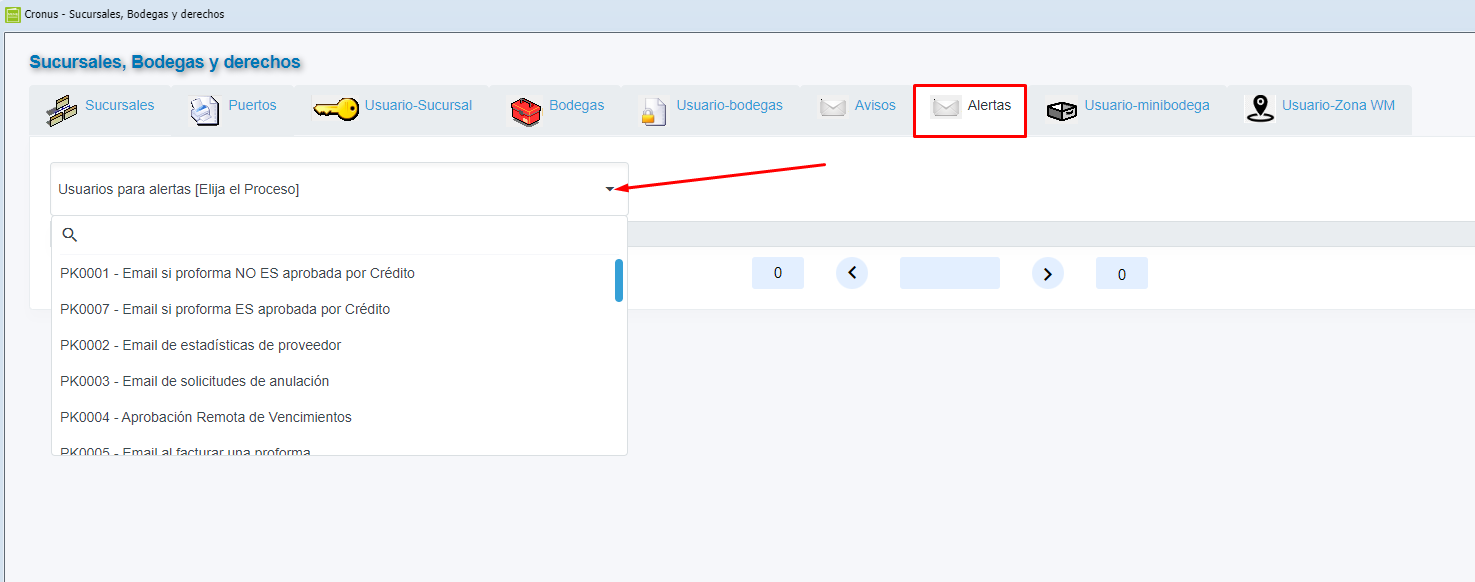
<span style="font-weight: 400; font-size: 12pt; font-family: arial, helvetica, sans-serif;">Para configurar los usuarios a los que se les avisa sobre los tickets pendientes de aprobar, se debe ingresar a la pantalla de configuración de alertas:</span>

<span style="font-weight: 400; font-size: 12pt; font-family: arial, helvetica, sans-serif;"></span>

<span style="font-weight: 400; font-size: 12pt; font-family: arial, helvetica, sans-serif;">Se marca en el combo la configuración indicada y se eligen los usuarios correspondientes:</span>

[![Alertas.png](https://ayuda.cronuserp.com/uploads/images/gallery/2025-08/scaled-1680-/alertas.png)](https://ayuda.cronuserp.com/uploads/images/gallery/2025-08/alertas.png)<span style="font-weight: 400; font-size: 12pt; font-family: arial, helvetica, sans-serif;"></span>

<span style="font-weight: 400; font-size: 12pt; font-family: arial, helvetica, sans-serif;">El proceso de tickets funciona en las pantallas de anulación de facturas, recibos, movimientos de inventario y notas de crédito/débito.</span>

<span style="font-weight: 400; font-size: 12pt; font-family: arial, helvetica, sans-serif;"> </span>

<span style="font-size: 12pt; font-family: arial, helvetica, sans-serif;">**Facturas:**</span>

<span style="font-size: 12pt; font-family: arial, helvetica, sans-serif;"><span style="font-weight: 400;">Si el usuarios no tiene derechos al proceso </span>**ANULAFAC**<span style="font-weight: 400;"> el sistema solicitará un TICKET de aprobación.</span></span>

<span style="font-size: 12pt; font-family: arial, helvetica, sans-serif;">**Inventario:**</span>

<span style="font-size: 12pt; font-family: arial, helvetica, sans-serif;"><span style="font-weight: 400;">Si el usuario no tiene derechos al proceso </span>**INVENELI01**<span style="font-weight: 400;"> el sistema solicitará un TICKET de aprobación.</span></span>

<span style="font-size: 12pt; font-family: arial, helvetica, sans-serif;">**NC y ND:**</span>

<span style="font-size: 12pt; font-family: arial, helvetica, sans-serif;"><span style="font-weight: 400;">Si el usuario no tiene derechos al proceso </span>**CXCPERMNNC**<span style="font-weight: 400;"> y/o </span>**CXCPERMNND**<span style="font-weight: 400;"> el sistema solicitará un TICKET de aprobación.</span></span>

<span style="font-size: 12pt; font-family: arial, helvetica, sans-serif;">**Recibos:**</span>

<span style="font-size: 12pt; font-family: arial, helvetica, sans-serif;"><span style="font-weight: 400;">Si el usuario no tiene derechos al proceso </span>**ANULA\_RECIBOS**<span style="font-weight: 400;"> el sistema solicitará un TICKET de aprobación.</span></span>

<span style="font-weight: 400; font-size: 12pt; font-family: arial, helvetica, sans-serif;"> </span>

<span style="font-size: 12pt; font-family: arial, helvetica, sans-serif;">**Aprobación de tickets:**</span>

<span style="font-size: 12pt; font-family: arial, helvetica, sans-serif;"><span style="font-weight: 400;">El derecho para aprobar tickets es el siguiente : </span>**TIKETSAPROB**</span>

<span style="font-weight: 400; font-size: 12pt; font-family: arial, helvetica, sans-serif;">Para aprobar o rechazar tickets, se debe ingresar a la misma pantalla:</span>

<span style="font-weight: 400; font-size: 12pt; font-family: arial, helvetica, sans-serif;">![Tiquetes de operacion.png](/files/CRONUS-WEB-CRONUS-Movimientos-Tiqutes-de-opercacion/Tiquetes%20de%20operacion.png)</span>

<span style="font-weight: 400; font-size: 12pt; font-family: arial, helvetica, sans-serif;">Al rechazar o aprobar, el documento no es modificado, simplemente se genera un aviso al usuario en donde se le indica que ya puede o no ejecutar el proceso:</span>

![Tiquetes de operacion 2.png](/files/CRONUS-WEB-CRONUS-Movimientos-Tiqutes-de-opercacion/Tiquetes%20de%20operacion%202.png)